An AI agent is software that reads incoming information, makes a judgment about it, and takes the next step in your business tools without someone doing it by hand. A chatbot answers questions in a chat window. A Zapier-style workflow follows fixed "when this happens, do that" rules. An agent sits between the two: it follows the process you define, but it can handle messy, real-world inputs like a vague email or a half-filled form.
What does an AI agent actually do?
Think of an agent as a new team member who handles one specific job, every time, in the tools you already use. A typical agent does four things:
- Reads something new: an email, a form submission, a document, a CRM update.
- Understands it: what the person is asking for, which client it belongs to, how urgent it is.
- Decides the next step, based on rules and examples you approve.
- Acts: updates the CRM, drafts a reply, creates a task, or routes the request to the right person.
The U.S. National Institute of Standards and Technology describes an AI system as one that can, for a given set of objectives, generate outputs such as predictions, recommendations, or decisions. An agent is that idea put to work inside a business process.
How is an AI agent different from a chatbot?
A chatbot waits for someone to type a question, then answers it. It lives in a chat window and usually ends when the conversation ends.
An agent works in the background, whether or not anyone is chatting. It doesn't just respond. It moves work forward: logging the request, updating records, and handing off to a person when needed. Many businesses use both. A chatbot can collect a request, and an agent can make sure that request actually gets handled.
How is an AI agent different from Zapier or other automation tools?
Zapier defines a Zap as an automated workflow made of a trigger and one or more actions, like "when a new email arrives, send a text." Rule-based workflows like this are reliable and inexpensive, and they're a great fit when the input is always the same shape.
They struggle when the input varies. A rule can't easily tell the difference between "please add my new car to the policy" and "I sold my car, please remove it" if both arrive as free-form emails. An agent can read the meaning, pick the right path, and still use tools like Zapier to carry out the steps. Zapier itself now offers agent features, so the line is blurring. The useful question isn't which brand to buy. It's whether your workflow needs judgment or just rules.
| Chatbot | Rule-based workflow (like a Zap) | AI agent | |
|---|---|---|---|
| Starts when | Someone types a message | A set trigger fires | New work arrives in any form |
| Handles messy input | Some | Poorly | Well |
| Takes action in your tools | Limited | Yes, fixed steps | Yes, chooses the right steps |
| Best for | Answering common questions | Simple, predictable handoffs | Repetitive work that needs a little judgment |
How does White Feather AI's Hermes system work?
Hermes is the system behind our Custom Automated AI Agent. The AI models, like ChatGPT or Claude, do the thinking and writing. Hermes is the manager around them: it plans the steps, chooses the right tool, remembers context, carries out each step, and keeps going until the job is done. It runs on a private, always-on server with access to the browser, files, APIs and business apps the work needs.
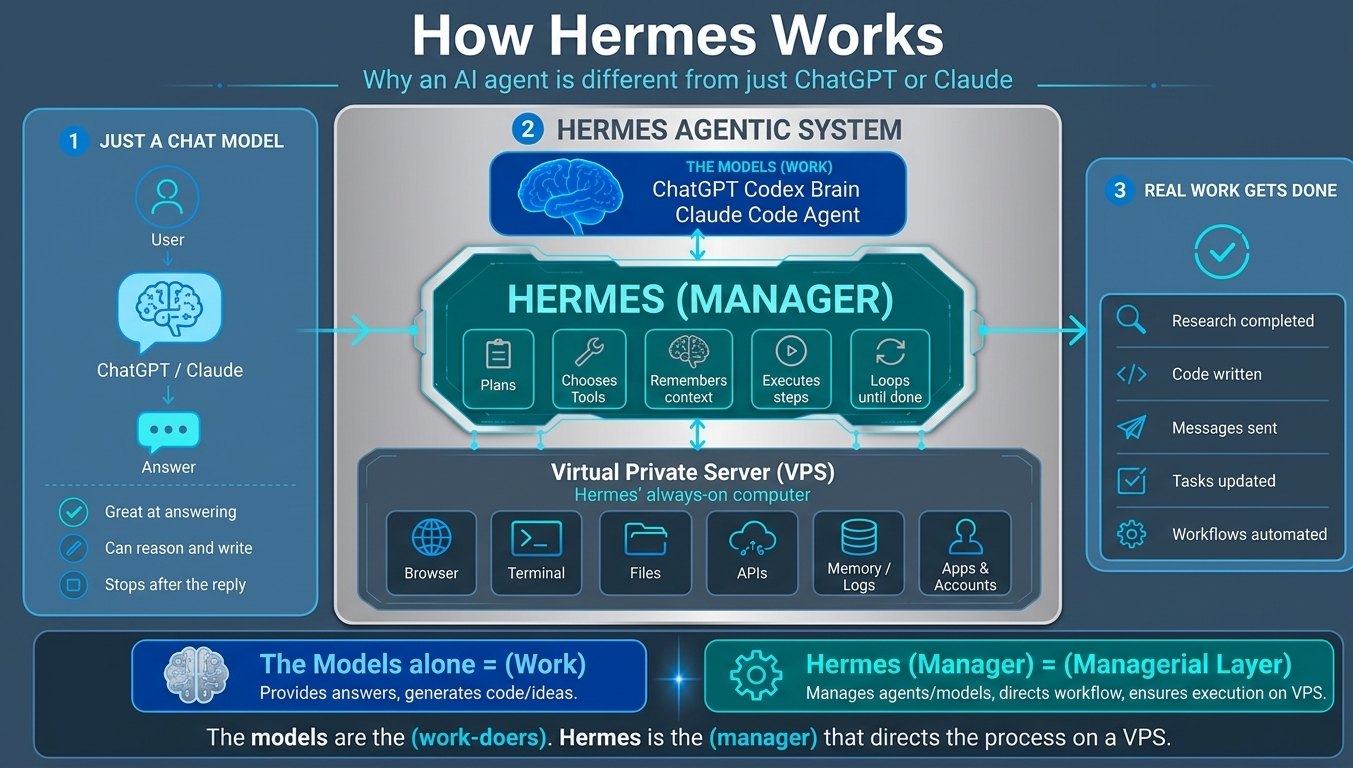
That's the practical difference: a chat model stops after the reply, and an agent system finishes the work.
What kinds of work are a good fit for an AI agent?
The best first job for an agent is work that is repetitive, happens often, and follows a pattern your team could explain in a few minutes. Common examples:
- Sorting and routing inbound emails and form requests
- Keeping the CRM updated after calls, emails and meetings
- Drafting routine replies for a person to review and send
- Chasing missing documents or information from clients
- Pulling data from one system into a report or another system
Work that needs a licensed professional's judgment, or a sensitive conversation, should stay with your people. A good agent frees them up for exactly that work.
Do we need a technical team to use an AI agent?
No. Most growing companies don't have engineers on staff, and they don't need them. The agent should connect to the tools you already use, and your team should be able to see and adjust what it does. At White Feather AI, we build the agent, test it on real examples with your team, and train your people to run it. You own the system when we hand it off. See how a Custom Automated AI Agent works.
How do you get started?
Start with one workflow, not a company-wide overhaul. Pick the task that eats the most hours each week, map how it works today, and automate that first. Once it runs reliably, you'll know what to tackle next.
Not sure where you stand? Take the 2-minute AI readiness quiz to get a readiness score and a recommended next step, or book a 15-minute call.
Frequently asked questions
Is an AI agent the same as ChatGPT?
No. ChatGPT is a general assistant that you talk to. An AI agent is built for one job inside your business and connected to your tools. It may use a similar AI model underneath.
Will an AI agent replace my staff?
It's designed to take repetitive tasks off their plate, not to replace their judgment. Most teams use the time for client work that was getting squeezed.
Can an AI agent make mistakes?
Yes, like any system. That's why a well-built agent is tested on real examples before launch, keeps a person in the loop for important decisions, and logs what it does so you can review it.
Is our data safe with an AI agent?
A well-built agent connects through your tools' existing, secure integrations, and your data stays in the systems you already use. Ask any vendor exactly where your data goes and who can see it.
How long does it take to set up an AI agent?
For a single workflow, most White Feather AI integrations go from scoping call to go-live in 3 to 6 weeks, depending on complexity.